This plugin is almost right for me, but there’s this feature I desperately need. Can you add it?
If I need the feature myself for a website I am working on, I am definitely going to code it. If not, I might add it sooner of later. If you really need this feature you can offer to sponsor the plugin development. This way we make a deal, and you can be sure I’ll implement the feature in a specific amount of time.
I enabled the Maps integration, but instead of the map there is a green background. What should I do?
I call that Green Screen of DeathTM, but it’s quite easy to fix your issue. If you see that green background, your theme has a little problem that should be fixed. Open the header.php page of your theme; if your theme hasn’t any header.php page, just open the index.php page and/or any page containing the <head> section of the html code. Make sure that the page contains a line with wp_head(); inside php tags.
If your page(s) doesn’t contain such line, add it just before the line containing </head>. Now everything should work right.
For curiosity’s sake, wp_head(); is an action hook, that is a function call allowing plugins to insert their stuff in WordPress pages; if you’re a theme maker, you should make sure to include wp_head() and all the necessary hooks in your theme, inside php tags.
The same accounts for footer.php and the function call wp_footer();. Add wp_footer(); just before the </body>-tag (see the footer.php file in the standard Twenty Ten theme).
Now, to make things easier, I added an option “Always include JS in header?” which can help you here as well, if you’re unable to make the change to the theme footer.php file.
My calendar doesn’t advance to the next or previous month?
See the answer above concerning the maps problem.
How do I resize the single events map? Or change the font color or any style of the balloon? Or any other style element?
See the documentation, section “Concerning the layout: CSS”
Can I further customise the event page?
Sure, you can do that by editing the page and changing its template. For heavy customisation, you can use the some of the plugin’s own conditional tags, described in the “Conditional Template Tags” section in the documentation.
How does Events Made Easy work?
When installed, Events Made Easy creates a special “Events” page. This page is used for the dynamic content of the events. All the events actually link to this page, which gets rendered differently for each event.
Are events posts?
Events aren’t posts. They are stored in a different table and have no relationship whatsoever with posts.
Why aren’t events posts?
I decided to treat events as a separate class because my priority was the usability of the user interface in the administration; I wanted the users to have a simple, straightforward way of inserting the events, without confusing them with posts. I wanted to make my own simple event form.
If you need to treat events like posts, you should use one of the other excellent events plugin.
Is Events Made Easy available in my language?
At this stage, Events Made Easy is available in English, Dutch, French, German, Slovak, Swedish and partially in other languages. The plugin is fully localisable; I welcome any translator willing to add a translation of Events Made Easy into his mother tongue. All translations are managed on https://translate.wordpress.org/projects/wp-plugins/events-made-easy/
How to add a “Add to Google Calendar” link to an event
Add the following to the single event format (on one line):
<a target="_blank" href="https://www.google.com/calendar/event?action=TEMPLATE&text=#URL_NAME&dates=#_{Ymd}T#H#_{i}00/#@_{Ymd}T#@H#@_{i}00&sprop=#URL_EVENTPAGEURL&location=#URL_ADDRESS,+#URL_TOWN&details=#URL_NOTES">Add to Google Calendar</a>A small discount code example
Say you want to give a discount if more than 1 place is booked, then put the following in your theme functions.php (for a single-price-category event):
add_action('eme_insert_rsvp_action', 'my_eme_discount_function',20,1);
function my_eme_discount_function($booking) {
   global $wpdb;
   $bookings_table = $wpdb->prefix.BOOKINGS_TBNAME;
   $where = array();
   $fields = array();

   $booking_id = $booking['booking_id'];
   $event_id = $booking['event_id'];

   if ($event_id == 5) {        /* put in the event_id that needs processing, or leave out this line to process all events */
      //echo 'EVENT ID='.$event_id .' Booking_id = '.$booking['booking_id'];

      $seats=$booking['booking_seats'];
      $price=$booking['booking_price'];

      // more than 2 seats, then the price is 25 per seat
      if ($seats> 1)
          $price = 25;

        // below a small example to check own input
	//$coupon = "";
        //$answers = eme_get_booking_post_answers($booking);
        //foreach ($answers as $answer) {
        //    if ($answer['field_name'] == "MY_FIELD_NAME") {
        //       $coupon = $answer['answer'];
        //    }
        //}
        // now check $coupon for your wanted value

      $fields['booking_price'] = $price;
      $where['booking_id'] = $booking['booking_id'];
      $wpdb->update($bookings_table, $fields, $where);
   }
   return;
}
A small booking form evaluation code example
See the EME documentation on hooks and filters for complete examples.
How to add more currencies to the list?
See the page on hooks and filters for currency-related filters: eme_add_currencies, eme_add_zero_decimal_currencies and eme_add_currency_codes
How to remove all EME-related tables and settings?
Go into the settings of EME and check the option “Delete all EME data when uninstalling?”.
Then deactivate (and reactivate if wanted) EME.
This setting will delete all old tables and settings concerning EME, so you’ll start with a empty events manager after reactivation then.
How to generate correct headers for a facebook-sharing plugin
EME already generates the correct headers for FB to interprete, so a plugin like Add-To-Any should work just fine.
Warning: some plugins (SEO or sharing) create their own og-tags, these would then interfere with the ones you created here, make sure that you either disable the event page in the settings of those plugins, or add filters/remove actions to your theme functions.php to prevent this. One example is for Jetpack:
// remove jetpack open graph tags

remove_action('wp_head','jetpack_og_tags');
If that doesn’t work (people report that since version 2.0.3 this no longer works), you can try:
add_filter( 'jetpack_enable_opengraph', '__return_false', 99 );
or (if that doesn’t work):
add_filter('jetpack_enable_open_graph', '__return_false', 99);
Also use the facebook debugging tools for debugging facebook issues.
How to redirect automatically to paypal after successful booking
From version 2.2.32 onwards, this is an option in the generic payment settings: setting “Redirect immediately to payment gateway?”. By default, people get a list of payment gateways to choose from before being redirected to the payment gateway of choice. Select yes to immediately redirect to the payment gateway if there is only one payment gateway to chose from. This redirect takes also the setting “Redirect wait period” into account. The text above the payment button of the relevant payment gateway will then also be shown.
Go into the settings of EME, tab “Payments” and add this to the setting “Payment form header format”:
<script type="text/javascript">

jQuery(document).ready( function($) {

$( "#eme_paypal_form" ).submit();

});

</script>
Of course, you can redirect to another gateway too, just replace “#eme_paypal_form” by e.g. “#eme_stripe_form” (for redirecting to Stripe), see the generated html to find the correct form name of the relevant gateway.
How to add events to your wordpress search results?
Since events aren’t posts, they are not shown by default in your search result. But by using a child theme and changing some lines in your theme’s search.php, you can shown them in any way you want.
So, create a child theme and edit search.php there.
At the beginning of search.php, add this line:
$events = eme_wordpress_search_events();In EME before version 1.7.11, this is called just eme_wordpress_search() and will be available as backwards compatibility function call.
Further down in search.php, change:
<?php if ( have_posts() ) : ?>to:
<?php if ( have_posts() || !empty($events) ) : ?>And then, just above the call for
<?php while ( have_posts() ) : the_post(); ?>(or wherever you want it), add something like this:
<?php foreach ($events as $event) {
   print "<h2><a href='".eme_event_url($event)."'>".$event['event_name']."</a> ".eme_localized_date($event['event_start'])."</h2>";
   print substr($event['event_notes'],0,250)."[...]";
   print "<div style='clear:both;'></div>";
} ?>
eme_localized_date shows the date according to your WP preferences, but you can also use eme_localized_datetime or eme_localized_time (or just $event[‘event_start’] to have the untranslated version of the event start datetime).
You can even use shortcodes here, but I suggest to keep things simple …
The function eme_wordpress_search_events also takes 1 parameter, namely the scope of the events to search in. By default the scope is “future”, but you can also specify “past” or “all”:
$events = eme_wordpress_search_events("all");How to add locations to your wordpress search results?
Identical to eme_wordpress_search_events(), you can use eme_wordpress_search_locations() to show locations matching your search query (from EME version 1.7.11 onwards only).
How to make EME and Yoast play nice together?
EME tries to remove Yoast headers for the special events page. If that doesn’t work, try the method below to remove the Opengraph (and optionally twitter) headers generated by Yoast for EME events.
Add this to your functions.php (add all filters wanted, see the Yoast documentation and as a shortlist https://bydik.com/remove-yoast-seo-meta-tags/ ) :
function eme_remove_yoast($myfilter) {
   if ( eme_is_single_event_page() || eme_is_single_location_page() ) {
      return false;
   }
   return $myfilter;
}
add_filter ('wpseo_json_ld_output', 'eme_remove_yoast');
add_filter ('wpseo_canonical', 'eme_remove_yoast');
add_filter ('wpseo_metadesc', 'eme_remove_yoast');
add_filter ('wpseo_metakeywords', 'eme_remove_yoast');
add_filter ('wpseo_locale', 'eme_remove_yoast');
add_filter ('wpseo_opengraph_title', 'eme_remove_yoast');
add_filter ('wpseo_opengraph_desc', 'eme_remove_yoast');
add_filter ('wpseo_opengraph_url', 'eme_remove_yoast');
add_filter ('wpseo_opengraph_type', 'eme_remove_yoast');
add_filter ('wpseo_opengraph_image', 'eme_remove_yoast');
add_filter ('wpseo_opengraph_show_publish_date', 'eme_remove_yoast');
add_filter( 'wpseo_title', 'eme_html_title' );
The last filter (wpseo_title) is currently specific for the latest Yoast version, and if you use it you may want to add your sitename to the EME settings called “Single event html title format” and “Single location html title format” (reason: this filter does not add the sitename by default to your html title).
As a last step: if the YOAST SEO plugin is in use, then the default EME Events Page should NOT have any text in the Meta Description within YOAST SEO settings for this page.
How to make EME and “The SEO Framework” play nice together?
The SEO Framework adds its own canonical urls while EME adds them also. Since the one from The SEO Framework are related to the “special” events page, they should be removed. This small snippet in your theme functions.php will help (see also https://theseoframework.com/docs/api/filters/ ):
add_filter( 'the_seo_framework_query_supports_seo', function( $supported ) {
	if (eme_is_single_event_page() || eme_is_single_location_page()) {
			$supported = false;
	}
	return $supported;
} );
Peer certificate did not match
This means the certificate of your smtp server is in fact not correct or you’re using localhost as mailserver. Using ‘localhost’ as a mailserver and using a secure connection to your mailserver will definitely cause this problem, since no certificate in the world validates ‘localhost’.
Activate the EME option to ignore certificate errors (in EME Settings => tab ‘Mail’, option ‘Verifiy SMTP certificates’) or use correct SMTP server settings (and not localhost).
Warning: there was a problem sending you the registration mail
This means your email settings are not correct. Go in the EME options menu and check your email settings. If using SMTP as mail sending protocol, temporary activate SMTP debugging to see what happens and send a test email (via the ‘Send Mail’ submenu). Fix the problems that arise or ask your provider for the mail settings you should use. If you don’t and regular WP mail works, try ‘PHP mail’ as mail sending protocol.
Add more info for Google when indexing your event
How to add extra info (via json) to your events so google shows the hour and allows to book? See 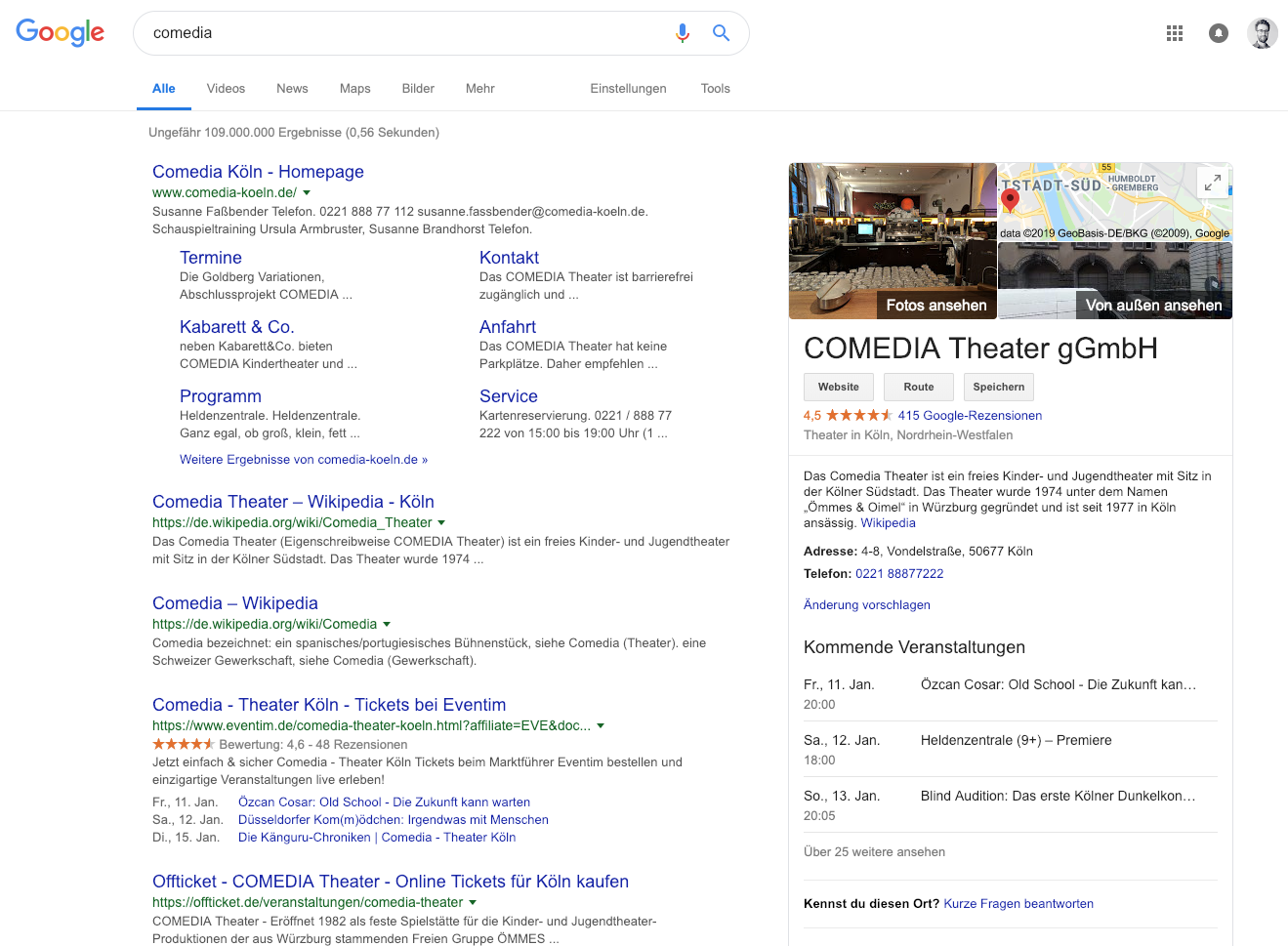
This can be done by adding the following in the “Extra event html headers”:
<script type="application/ld+json">
{
  "@context": "http://www.schema.org",
  "@type": "Event",
  "name": "#_EVENTNAME",
  "url": "#_EVENTPAGEURL",
  "description": "#_EXCERPT",
  "startDate": "#_STARTDATE{Y-m-d}T#_24HSTARTTIME",
  "endDate": "#_ENDDATE{Y-m-d}T#_24HENDTIME",
  "location": {
    "@type": "Place",
    "name": "#_LOCATION",
    "address": {
      "@type": "PostalAddress",
      "streetAddress": "#_ADDRESS",
      "addressLocality": "#_CITY",
      "postalCode": "#_ZIP",
      "addressCountry": "#_COUNTRY"
    }
  }
}
 </script>
Remark: EME does this for you already
For more info on this, see the google dev documentation.
Issue “Form tampering detected”
The frontend EME forms (rsvp, memberships and others) are protected by a nonce. If you have a caching plugin, that can interfere with the validity (lifetime) of the nonce, so exclude that page from your cache or set your cache time much shorter than the nonce lifetime (which is 12 hours by default).
Or, even better: don’t use a caching plugin (I never understood how a caching plugin could cache dynamic pages …), one should use Varnish and/or nGinx/Apache as a reverse-proxy cache over a plugin (and maybe use Redis as a persistent object cache if possible).